


Starting today, your customers can pay with Google Pay, the secure and fast way
Google Pay is a digital wallet provided by Google that offers a simple and secure payment experience, allowing shoppers to make purchases with major credit cards (Such as Master Card, Visa, American Express, Discover) saved in their Google account, including those from Google Play, YouTube, Chrome, or any Android device
Easy and secure
You can use it for both online shopping and at businesses, with hundreds of millions of people
They add payment cards to their Google accounts
that they can use to checkout with any google product
without entering their payment information each time.
You can enable the same shopping experience without effort
for your services and products.
 Customers can pay with any credit card stored in their Google account. It allows for seamless online shopping within the Android app or in the Chrome browser
Quick and easy integration between your Android device and your computers browser
Customers can pay with any credit card stored in their Google account. It allows for seamless online shopping within the Android app or in the Chrome browser
Quick and easy integration between your Android device and your computers browser
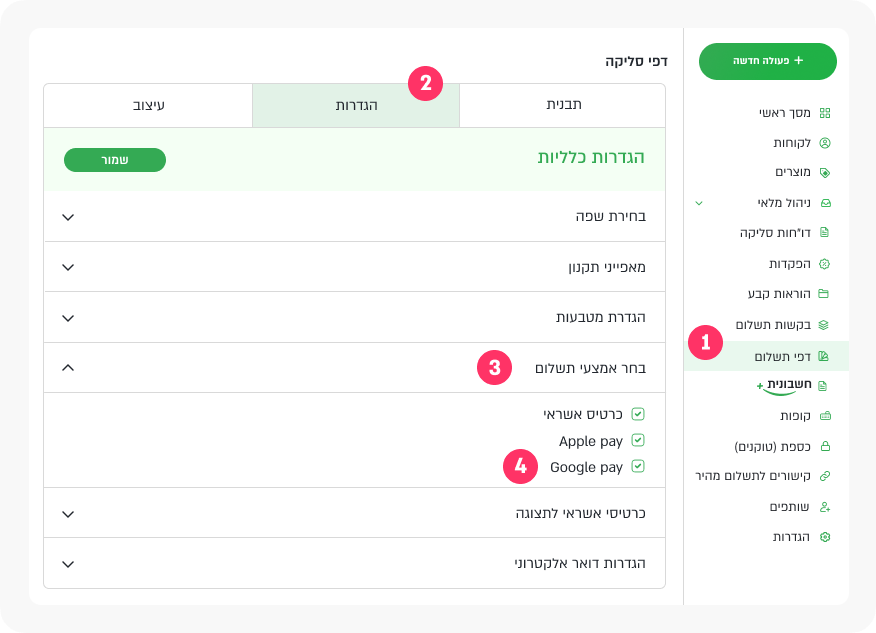
How to set Google Pay in payment pages
In payment page setting under the tab "Choose payment method" activate the Google Pay option
How to connect to the service
Google Pay is fully integrated into the stored payment pages of PayPlus, saving you the hassle of dealing with codes on your end.
All you need to do is open a PayPlus account and request Google Pay as your extra payment method and start accepting Google Pay at your PayPlus payment page!

1
Opening a PayPlus account
Open a PayPlus account by filling the signup form to PayPlus
2
Set your PayPlus account:
Our agent will contact you to set and activate your account
3
Request Google Pay as payment method
Now, after having a PayPlus operational account, you can add Google Pay as a payment method in the secure payment pages of PayPlus under Settings -> Payment Methods